


The agent does the work, you confirm the changes.
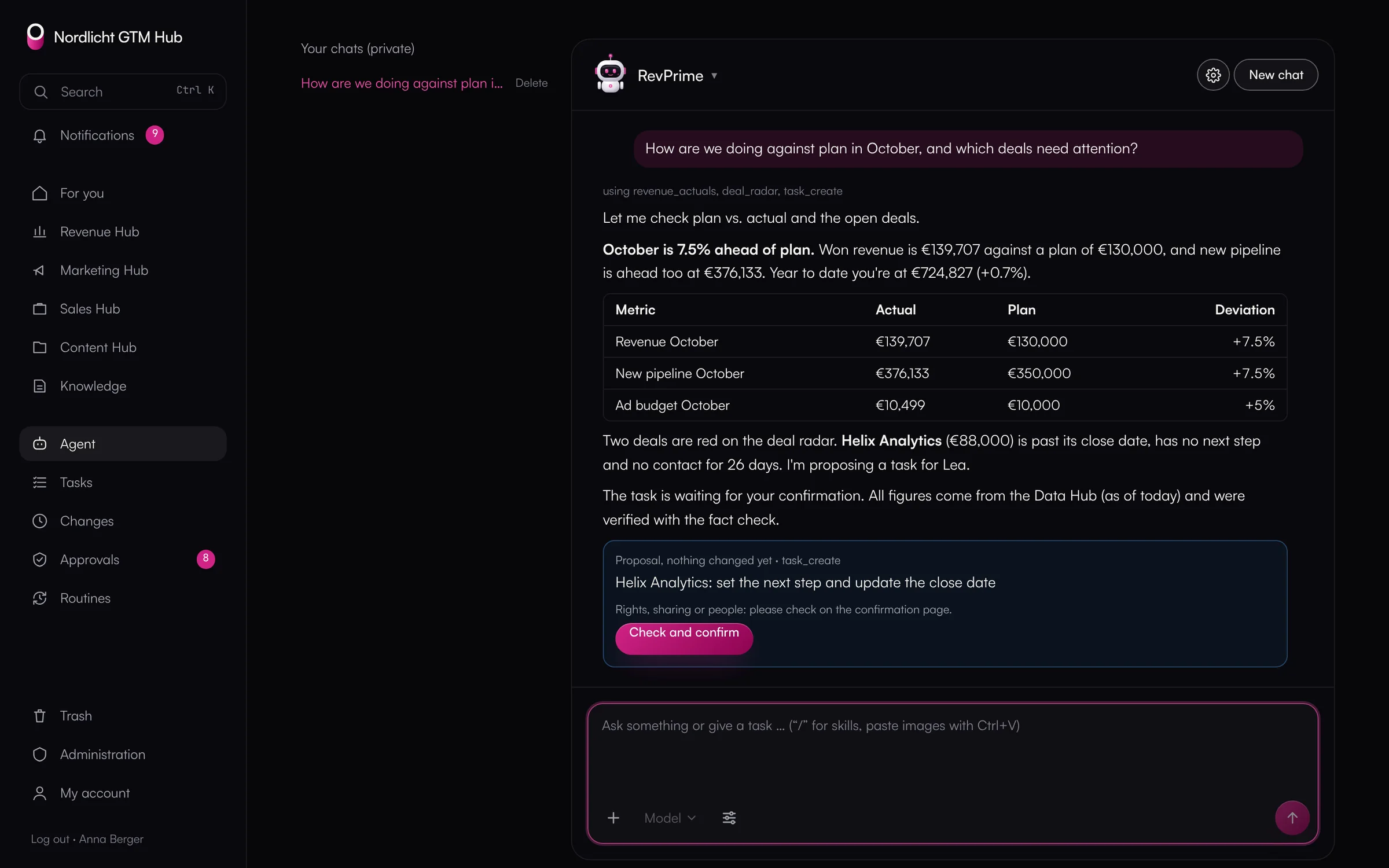
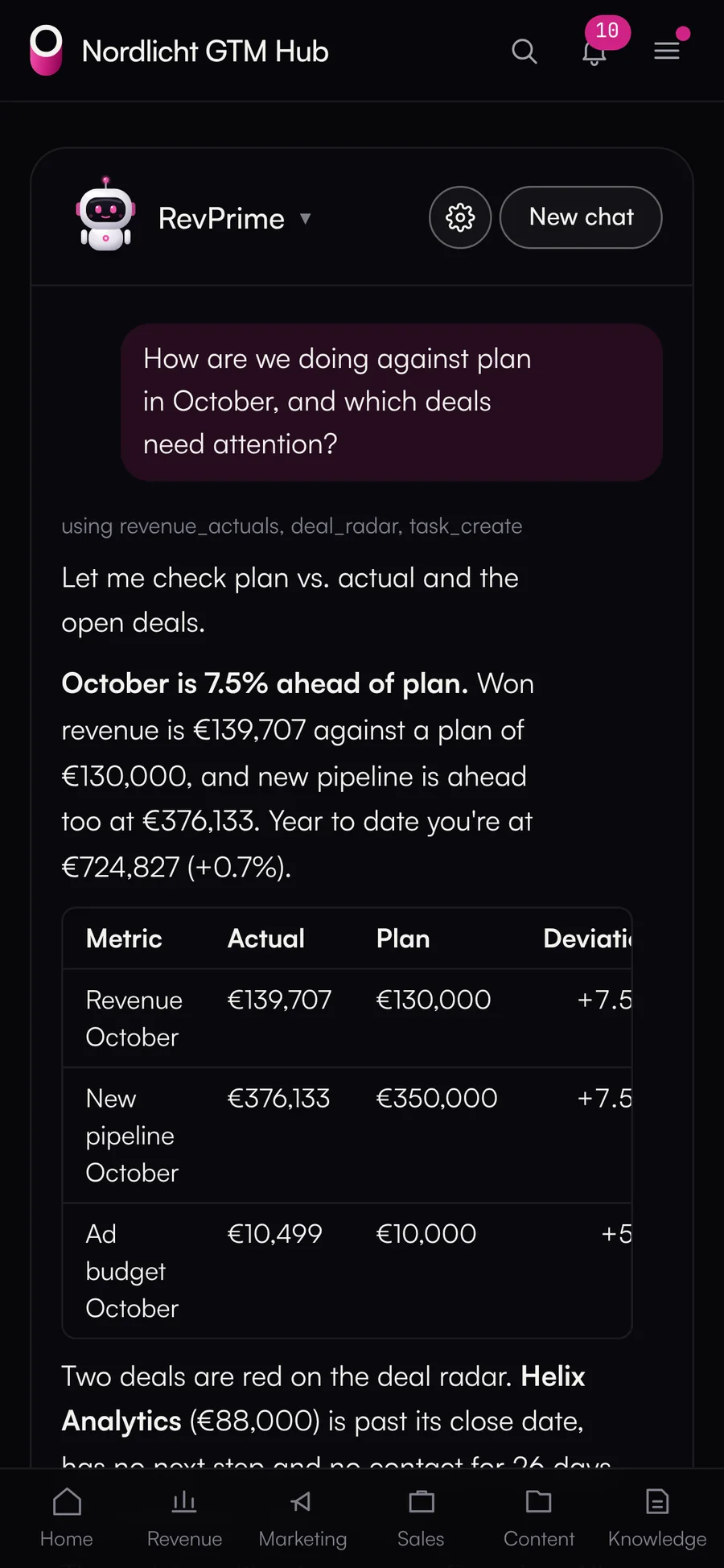
The GTM Hub agent reads plan, pipeline, campaigns and knowledge with the rights of the person asking, and uses the Data Hub's read tools along the way. When it wants to change something, it makes a proposal. The same goes for scheduled routines and for agents connecting from outside over MCP.
- Claude or OpenAI with your own API key
- Proposals instead of direct changes
- Monthly limit and kill switch
An agent with full rights is a risk, one without data is useless
If your team copies numbers into a chat by hand, the agent works with stale data. Give it an admin key and it can change anything the account can, and afterwards nobody can see what it did.
What the GTM Hub does.
One agent in every hub, scheduled routines and MCP for Claude, ChatGPT and Claude Code. Changes only as proposals.
- 01
Several agents, one framework
You set up agents with a briefing, a figure, a model, skills and connectors, say one for RevOps and one for demand gen. Chat on a page of its own or in a window in every hub.
- Anthropic (Claude) and OpenAI side by side, with selectable thinking depth
- Files and screenshots in the chat; tables, charts and HTML in the answer
- Voice input through the OpenAI key; recordings aren't stored
- Web research only if the person allows it for that chat
- 02
Proposals a person confirms
Every write action becomes a signed proposal with before and after, valid for 24 hours. Before it runs, the hub checks the current state again.
- Confirm with a button, a “yes” in the chat, or in bulk under Approvals
- Rights, sharing and people only on the confirmation page
- The history shows who the agent acted for and who confirmed
- 03
Scheduled routines
Routines run daily, weekly, every two weeks or monthly. They start from the Data Hub's playbooks or your own. By default they only read, with limits on cost and run time per run and per month.
- Runs with the rights of the routine's owner and pauses if those rights go away
- External routines, from Claude Code for example, report their runs over MCP
- 04
MCP and API
Every GTM Hub function is defined once and available the same way in the UI, the REST API, MCP and the agent. Claude, ChatGPT or Claude Code sign in with OAuth; write calls over MCP become proposals.
- The Data Hub's read tools come along through the same MCP server
- Personal tokens with an expiry date and scope per hub
- Everyone sees and ends their OAuth connections under My account
- 05
Cost and safety
A monthly cost limit (USD 100 per instance by default) and a kill switch are checked before every step. The hub redacts keys, email addresses and phone numbers in tool results. Chats are private and deleted after 90 days by default.
What you should know.
- The agent doesn't run without your own Anthropic or OpenAI API key.
- Web research is only available with Claude models.
- Mentioning the agent in comments and routines triggered by events are planned.
- Agents can never delete permanently, export, touch keys or grant approvals.
Frequently asked questions.
›Does the agent see everything in the GTM Hub?
No, only what the person asking can see. It works with their rights, and the database enforces the same rules with row-level security.
›Does our data go to Anthropic or OpenAI?
What the agent reads for an answer goes to the model of the provider you chose with your API key. Before that, the hub redacts keys, email addresses and phone numbers in tool results.
›Can I switch the agent off?
Yes. An admin switches it off for your whole instance or sets the monthly limit. Both are checked before every step.
- Collaboration & knowledgeHistory, versions, comments, tasks, approvals, knowledge and dashboards, the same in all four hubs.
- AI clients & MCPClaude, ChatGPT, Gemini, Copilot, Grok, Perplexity, OpenClaw, n8n and others sign in and get exactly the tools you enable.
- Guardrails & approvalsRules, approvals and limits for agents that write to your CRM and ad accounts.
See it with your own tools.
In 30 minutes, we'll show you the GTM Hub with your own tools and your use case.