


Ready for your IT review.
The RevPrime Data Hub manages access to your CRM, ad accounts and outbound tools. The GTM Hub keeps plans, campaigns, decks and files in a separate instance for your company. This page covers how both hubs protect your data, what they store and what they don't, and what's still missing. Everything here comes from the Data Hub's product documentation and the GTM Hub's specification.
- AES-256-GCM for all credentials
- Hosted in Frankfurt
- 2FA required for admins
- Every tool call logged
- No copy of your data
- Invite-only access
What protects your data: the Data Hub.
Encryption & keys
Secrets are encrypted in the database, and the key is kept separately. Anything the Data Hub only needs to verify is stored as a hash.
- AES-256-GCM with a random IV per value and an authentication tag
- Encrypted: OAuth tokens, API keys, Slack and Teams webhooks, approval arguments, 2FA secrets
- The key is a protected environment variable, not stored in the database
- MCP server and connect link tokens stored only as SHA-256 hashes, compared in constant time
- Passwords (12 characters minimum) stored only as scrypt hashes
Access & identity
Only invited people can log in to the admin area. Admins always log in with a second factor.
- No public sign-up; invitation links work once and expire
- Two-factor authentication (TOTP) required for platform and organization admins, plus ten recovery codes
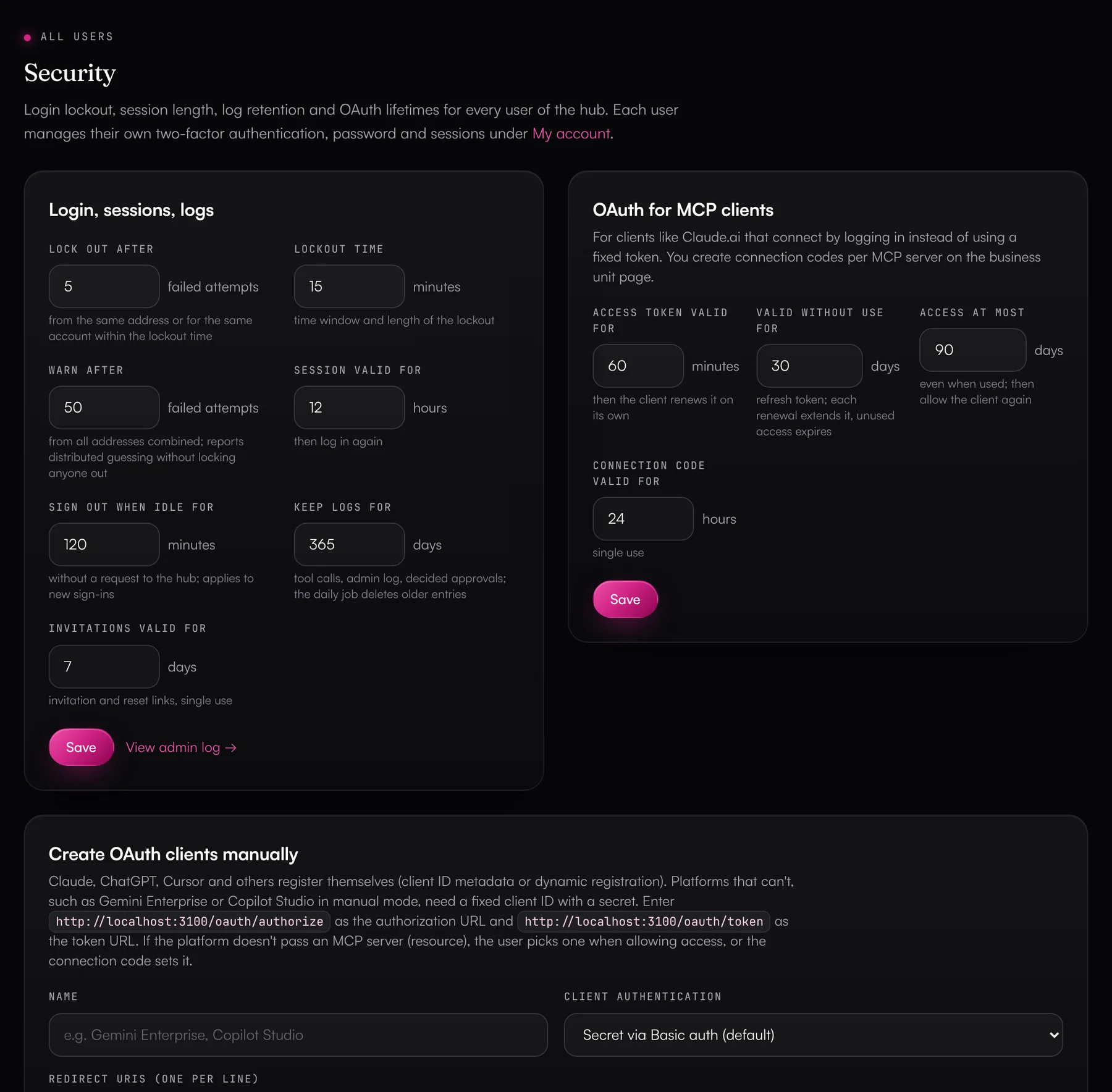
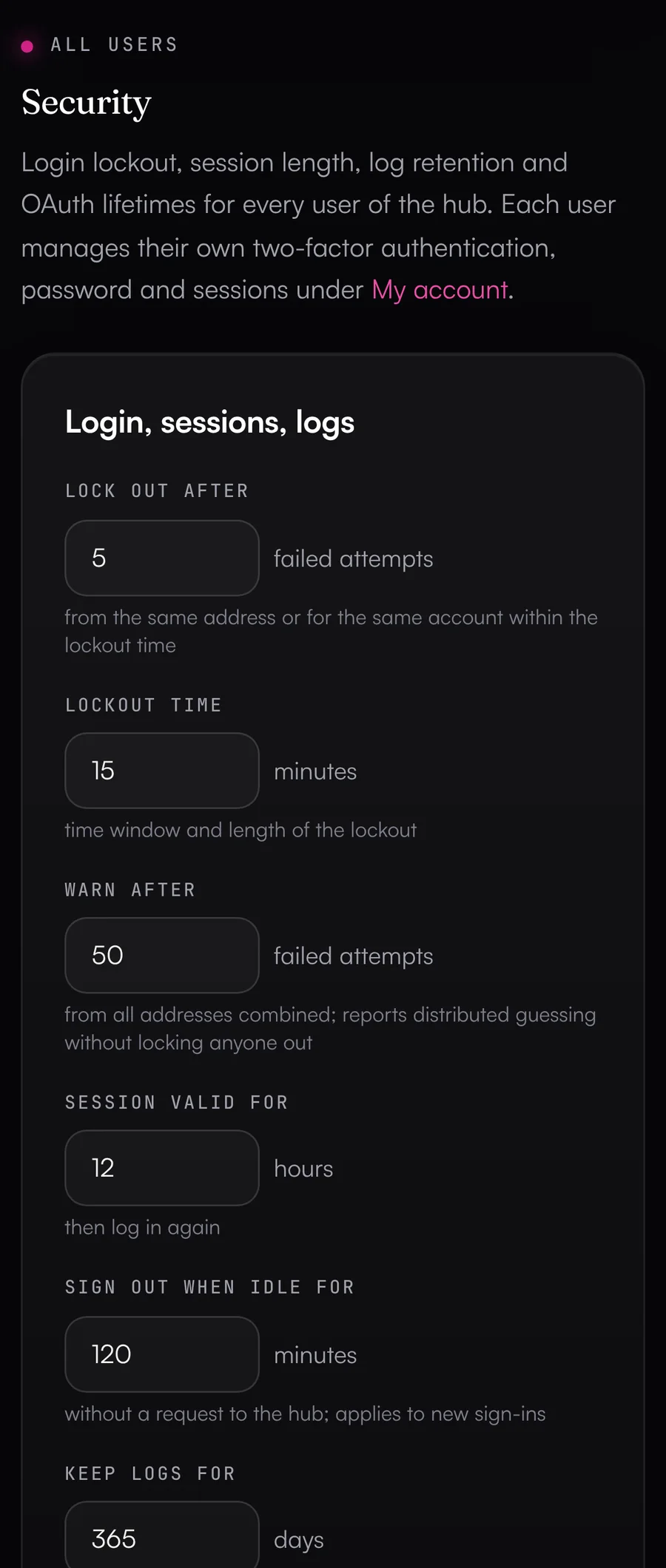
- Login lockout after 5 failed attempts in 15 minutes from the same address or for the same account; many failed attempts from different addresses trigger a warning
- Sessions last 12 hours (configurable 1–72), HttpOnly, Secure, SameSite=Lax; a deactivated user is logged out everywhere at once
- Three roles (platform admin, organization admin, business unit user); organizations can't see each other
Separate business units & permissions
Each team, brand or region gets its own business unit. The Data Hub checks every single object against the user's scope, and the database enforces the assignment on top of that.
- Objects outside your scope return 404, so you can't tell they exist
- An MCP server only knows the connections of its own business unit
- Access level per connection (Read, Write, Admin), checked on every request
- Allowed accounts limit logins with many accounts to specific properties and ad accounts
- The rights check shows which enabled tools the vendor doesn't allow for that connection
Control over agents
The Data Hub checks every write call with its actual arguments before anything reaches the vendor. You decide per MCP server what an agent may do.
- Write tools are never enabled by default, and deletes need approval by default
- Approve in the Data Hub or through an approval link; in Slack with a button (via the Slack app), in Teams through a link to the approval page
- Bulk brake above 10 records per call, emergency brake after 20 deletes per hour
- Custom and locked rules, plus limits per server (default: 50 write calls per day, 500 calls per hour)
- Fact check of figures against the source, and undo for HubSpot changes and campaign status
Logs & traceability
Every tool call and every change in the admin area is logged. The Data Hub doesn't store the content of responses.
- Activity log per business unit, including rejected calls and calls held for approval
- Admin log with logins and failed attempts, including IP address
- Approval decisions with the person who made them, also from Slack and approval links
- CSV export, and every export is logged too
- 365-day retention, configurable from 30 to 3,650 days
Privacy & data storage
The Data Hub fetches contacts, campaigns and reports from the vendor on every call and passes them only to the agent that asked. It stores configuration, credentials and logs.
- No copy of the content in your tools
- Application and database in Frankfurt
- Service providers: Vercel and Neon, optionally Resend, Slack and Microsoft Teams
- Data processing agreements are set up individually
- Deleting a business unit removes its credentials, MCP servers, links and log entries
Hosting & network
The Data Hub runs on Vercel in Frankfurt, and its Neon database is in Frankfurt as well. Outgoing requests only go to fixed vendor URLs.
- HTTPS only, with HSTS for 2 years including subdomains
- Security headers against clickjacking, MIME sniffing and leaking URLs via the referrer
- Connectors can only reach the vendor's base URLs and don't follow redirects
- Private network addresses (localhost, internal IPs) are blocked for custom connectors and image uploads
- Secrets are environment variables in Vercel; preview deployments don't touch the production database
How the GTM Hub protects your work.
Your company gets its own GTM Hub instance for plans, campaigns, decks, knowledge and files. The GTM Hub reads outside data only through the Data Hub, using a read-only service access. It adds safeguards of its own:
Your own instance
- Its own Vercel project in Frankfurt (fra1), its own Neon database in Frankfurt, its own private file storage, your domain
- Separate keys per instance; every instance runs the same code
- Updates roll out in rings, only with green tests and after a minimum soak time
- Daily backup (kept 30 days), point-in-time restore at Neon for the last 7 days and a daily health check
Login
- Password (scrypt, at least 12 characters) and an authenticator app with ten recovery codes, required for admins
- Passkeys for passwordless login or as the second step
- 15-minute lockout after five failed attempts
- Sessions per device (14 days), each visible and revocable on its own
Permissions checked twice
- Role per person and area (Revenue, Marketing, Sales, Content): edit, read or no access
- Visibility per item: private, teams, everyone, and personal for dashboards
- A central permission check in the app, plus row-level security in Postgres that the app role can't bypass
- “View as a person” is read-only for admins and logged
Untrusted HTML sandboxed
- Dashboards, reports, landing pages, decks and uploaded HTML or SVG only in a sandbox with its own CSP
- Inside the sandbox there's no network access, no cookies and no access to the GTM Hub
- Files are served through signed links that last 15 minutes and are tied to the person
- CSP with nonces and no unsafe-inline, cookies with the __Host- prefix
Agents
- Writes only as a signed proposal that a person confirms
- Never allowed: permanent deletes, exports, keys and tokens, instance settings, granting approvals
- Keys, email addresses and phone numbers in tool results are redacted
- Monthly limit and kill switch are checked before every step
Personal data and export
- Dashboards store only the fields a tile shows; every view of personal data is logged
- Views of deal rooms and share links are recorded without IP address or device
- Access and erasure per person (GDPR Art. 15 and 17)
- Full export at any time, and within 30 days if you leave
Every call leaves a record
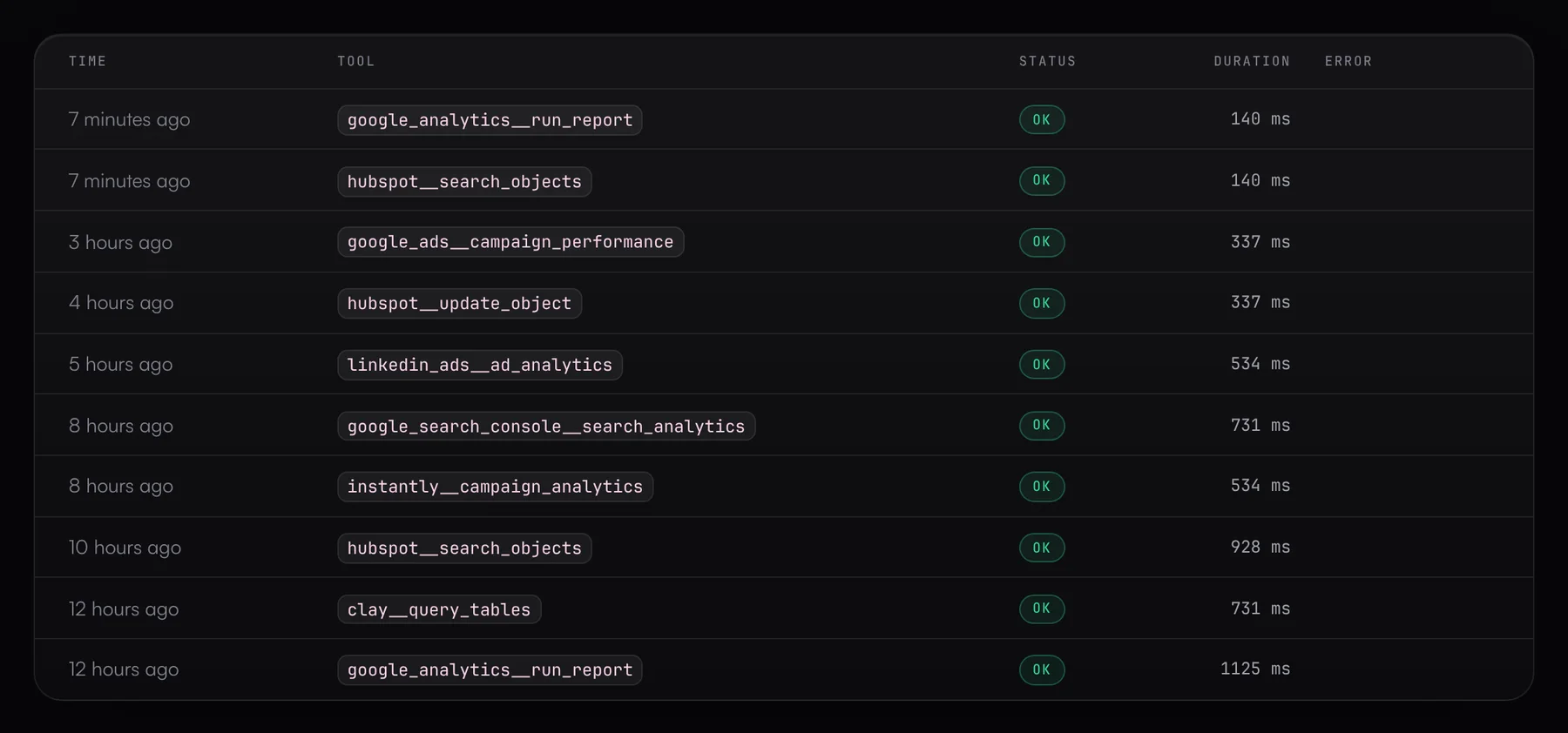
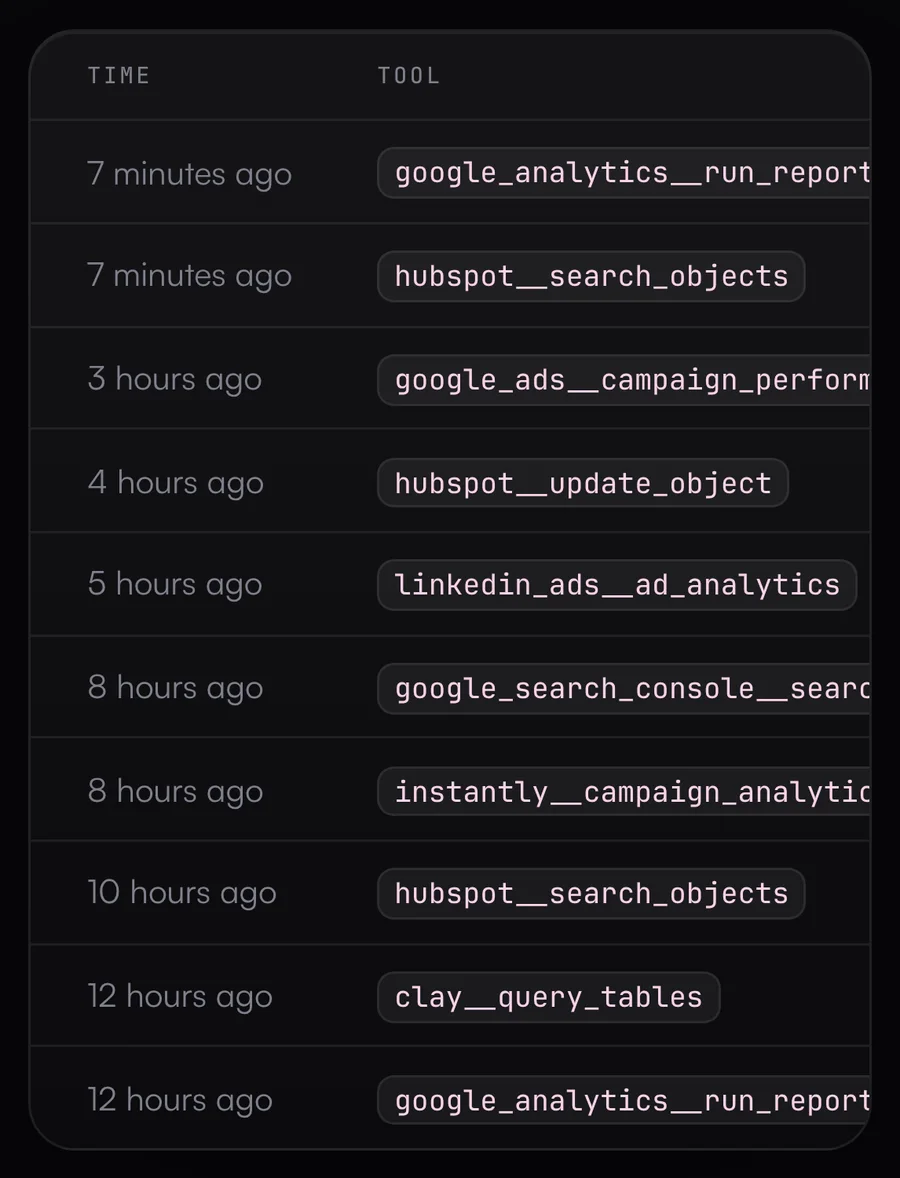
The activity log lists every tool call an agent makes, per business unit. The admin log shows who logged in and what changed in the admin area.
- Per call: time, MCP server, tool, success or error, whether it was a write call, duration and, if any, a shortened error message
- Includes rejected calls (limit, or block with reason) and calls waiting for approval
- Admin log: logins and failed attempts with IP, every change to business units, connections, MCP servers, links, connectors and settings, and every approval decision
- Both logs export to CSV; the activity log for the last 30 or 90 days or in full
- Deleted automatically after 365 days, configurable from 30 to 3,650 days
What the hub stores, and what it doesn't.
Not stored
- Content from your tools, such as contacts, deals, campaigns and reports. The Data Hub only passes it through to the agent that asked.
- Responses to tool calls. The log records the call, not the result. Vendor error messages are kept in shortened form (1,000 characters max) and can contain fragments of a request.
- Figures from cross-source reports and the fact check. Both query the vendor on each call and return the result only to the agent.
- Field contents for undo. The Data Hub only keeps record IDs, field names and the previous campaign status. Old field values come from HubSpot's property history.
- Passwords, recovery codes and MCP server tokens in plain text. Only hashes are stored.
What's coming next.
- Planned
Rate limits in the Vercel Firewall
We plan to add rate limits for login, OAuth authorization, client registration and connect links, with an optional IP allowlist for the admin area.
- Planned
Passkeys (WebAuthn)
Planned for the Data Hub as a phishing-resistant second factor or as a replacement for password plus TOTP. The GTM Hub already supports passkeys.
- Planned
Single sign-on (SSO/SAML)
Today your team logs in with email, password and a second factor. Login through your identity provider via SSO/SAML is planned.
- Planned
External key management (KMS)
We plan envelope encryption with a separate data key per business unit and key rotation. A database leak plus the main key would then no longer be enough on their own.
Questions from the security review.
›Where is our data hosted?
The Data Hub runs on Vercel in Frankfurt (fra1), and the PostgreSQL database on Neon, also in Frankfurt (aws-eu-central-1). Only configuration, encrypted credentials and logs are stored there, never content from your tools.
›Who can see our credentials?
They're encrypted with AES-256-GCM in the database and only decrypted in memory for the duration of a request. Agents never see tokens or keys, and the admin interface doesn't display stored credentials. Whoever on your team holds the admin access to a tool doesn't have to email it around either. They connect the tool themselves through a connect link.
›Can igromo see our data?
igromo's platform admins run the Data Hub and have access to every business unit, including your business units' configuration and logs. Content from your tools isn't stored in the Data Hub, and the interface doesn't show credentials to anyone.
›How do AI agents authenticate?
Either with a token per MCP server (256 bits of randomness, stored only as a hash) or via OAuth. For OAuth, the Data Hub is its own authorization server per the MCP specification: PKCE with S256 is required, each token is valid for exactly one MCP server, access tokens expire after 60 minutes, and refresh tokens rotate on every renewal.
›Can we revoke access immediately?
Yes. A disabled MCP server rejects every call, renewing a token invalidates the old one at once, and you can revoke every client connected via OAuth individually. Deactivated users are logged out right away, and you can revoke connect links at any time.
›What happens when we disconnect a tool or delete a business unit?
When you disconnect a tool, the Data Hub deletes the stored credentials for that connection. When you delete a business unit, the Data Hub removes all of its data: credentials, MCP servers including their tokens, connect links and log entries.
›What gets logged, and for how long?
Every tool call an agent makes, with time, tool, outcome and duration, plus logins and every change in the admin area. Both logs are deleted automatically after 365 days; you can set anywhere from 30 to 3,650 days. Failed login attempts are kept for 2 days, successful ones for 30 days, and undo references for 30 days.
›What about GDPR and a data processing agreement?
The Data Hub only passes content from your tools through and doesn't store it. Hosting and database are in Frankfurt. Service providers are Vercel and Neon, plus Resend, Slack or Microsoft Teams if you set up one of those channels. We agree on the data processing terms with you individually.
›Can an agent delete data or change records in bulk?
Not on its own. Deleting, archiving and unsubscribing need a person's approval by default, and you can block them entirely. A call that changes more than 10 records also needs approval, and after 20 deletes in an hour the server refuses any more.
›What can't the Data Hub do yet?
Single sign-on (SSO/SAML) isn't available yet; users log in with email, password and a second factor. The Data Hub doesn't support passkeys yet either. MCP clients with a metadata document authenticate as public clients with PKCE; private_key_jwt isn't supported yet. The Data Hub doesn't send invitations by email, and each user belongs to exactly one level, so not to several organizations.
Bring your IT team along.
We'll walk through the security model with your IT team and answer their questions directly.