


Deletes and bulk changes wait for a person.
Agents make mistakes, and in your CRM or ad accounts those mistakes take effect immediately. The Data Hub checks every write call with its actual arguments before anything reaches the vendor. Deletes and changes to many records need approval out of the box, and you set everything else per MCP server.
- Deletes only with approval
- Emergency brake after 20 deletes per hour
- Approve in the hub, by link or in Slack

“Clean up the CRM, would you?”
An agent takes a request like that literally. It deletes records it thinks are duplicates, or overwrites hundreds of contacts in a single call. Getting that data back is often painful, and you may not notice for days.
What the Data Hub does.
Rules, approvals and limits for agents that write to your CRM and ad accounts.
- 01
Guardrails out of the box
The Data Hub classifies every call as read, write or destructive. Deleting, archiving, removing and unsubscribing count as destructive. It detects them from the tool, the arguments and, for generic API requests, the method and endpoint.
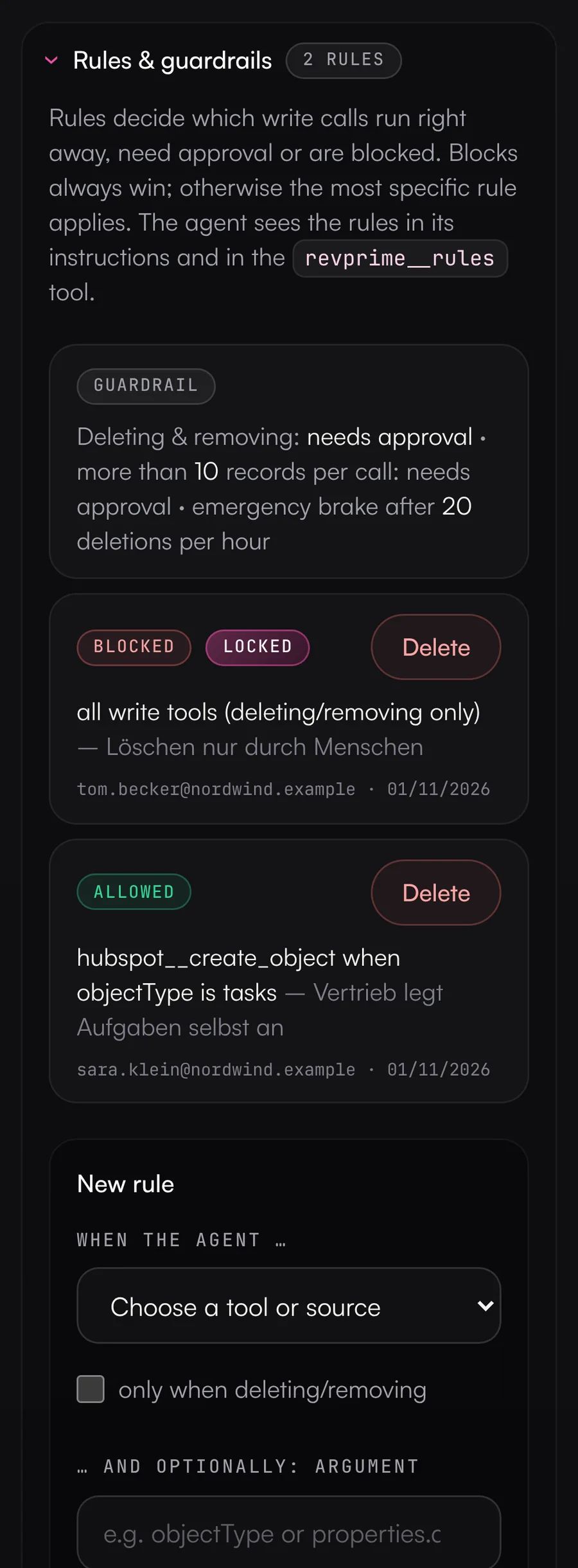
- Deletes wait for approval by default; you can also block or allow them entirely
- A call that changes more than 10 records needs approval (bulk brake, configurable)
- After 20 deletes in an hour, the MCP server rejects further ones and notifies you by email, Slack or Teams (emergency brake)
- 02
Your own rules per tool, source and argument
For a single tool or every tool of a source, you decide whether a call runs without approval, needs approval or is blocked. A rule can apply only to deletes or only to a specific argument, such as object type “tasks” or a budget up to 500. Blocks always win; otherwise the most specific rule applies.
- Platform and organization admins can lock rules. Business unit users then can't remove them and can only add stricter ones.
- The agent knows its rules up front, from the server instructions, every tool description and the revprime__rules tool.
- Tools that are always blocked aren't offered to the agent at all.
- 03
Approve where you already work
Per MCP server, you choose what needs confirmation on top of that: nothing (the default), all write tools or selected tools. The approval shows the tool, business unit, server and the full arguments. Once you approve, the action runs with exactly those arguments. If you reject it, nothing happens.
- In the hub on the Approvals page
- Through an approval link, for example to your head of sales or the CRM owner
- In Slack with “Approve & run” and “Reject” buttons when the Slack app is connected, otherwise with a link to the approval page
- In Microsoft Teams as a card that links to the approval page
- 04
Limits for every agent
Each MCP server has its own limits, by default 500 calls per hour and 50 write calls per 24 hours. Calls sent in parallel or in a batch can't get past them either. When a limit is hit, the agent gets a clear error and you get a single notification.
- 05
Access levels and careful defaults
Every connection is set to Read, Write or Admin. For Google Analytics, Search Console, Tag Manager, LinkedIn and Meta, the hub only requests the permissions of that level when connecting. Campaigns and ads are created as drafts or paused, and most Google Ads changes run as a dry run by default.
- 06
Vendor rights in view
A tool being enabled in the Data Hub doesn't mean the vendor allows it for the connected account. Under “Rights at the vendor”, each MCP server lists the tools that are missing there and how to fix it. The agent learns this through revprime__rules and doesn't try those tools in the first place.
- Granted permissions at Google, LinkedIn, HubSpot, Meta and Salesforce, e.g. a missing Marketing Hub
- Roles in LinkedIn and Meta ad accounts and in Search Console properties
- Vendor refusals in the log, including API keys
- 07
Undo with one click
If an agent changed something it shouldn't have, you revert it in the activity log. The hub stores no field contents for this, only references such as the record ID and field name. It fetches the old value from the vendor's history and doesn't overwrite anything someone changed since.
- HubSpot: changed fields, created records, notes, tasks and associations
- Campaign status in Google Ads, LinkedIn Ads, Meta Ads, Instantly and HeyReach (except archiving at Meta, which is final there)
- References are kept for 30 days
What you should know.
- The hub reads vendor roles only for LinkedIn, Meta and Search Console. With API keys, missing rights only show up once the vendor refuses a call.
- The hub doesn't control the confirmation prompt inside the AI client (such as “Allow?” in Claude). Its rules decide what may run on the server side without a person's approval.
- For vendor MCPs with their own logic, detecting deletes and bulk changes is a heuristic. When in doubt, add a “needs approval” rule or require approval for all write tools.
- Deletes, budgets, the generic request tool and vendor MCP tools can't be undone. For Google Ads, HubSpot, Salesforce and API key connections, the access level limits the tools in the hub, not the access at the vendor.
Frequently asked questions.
›Do I have to approve every change?
No. Out of the box, only deletes and calls touching more than 10 records need approval. If you require approval for all write tools, you can exempt routine work like creating tasks with a rule.
›Can someone without a Data Hub account approve actions?
Yes. Forward the approval link, for example to your head of sales or the HubSpot admin, or route requests to your team's Slack channel. Anyone with a hub account can decide on the Approvals page.
›What does the agent do while it waits?
It gets an approval ID and is told to wait. It checks the status with the revprime__approval_status tool. The agent never sees the approval link, so it can't approve its own request.
›How long does a request stay open?
72 hours, configurable from 1 to 720. If the agent repeats the identical call, no second request is created.
- Fact checkField definitions on every result, and every figure checked against the source before it goes into a report.
- Security & privacyEncrypted credentials, isolated business units and hosting in Frankfurt. The Data Hub keeps no copy of your CRM or campaign data.
- Teams & rolesOne business unit per team, product line or region, three roles and a daily check of every connection.
See it with your own tools.
In 30 minutes, we'll show you the Data Hub with your own tools and your use case.